
Writing for humans and machines: A guide to search-friendly technical writing

By Ashleigh Peré, seedscaleseo.com
Today, a significant amount of product-related questions begin long before a user reaches a manual, help centre or knowledge base. They begin in a search box. In other words, Google. This mirrors long-established UX findings showing that people rely on external search rather than internal navigation when seeking information (Nielsen Norman Group).
Whether someone searches for “how do I reset Model X?” or “how to fix error code 10,” search engines (and increasingly AI-generated answer summaries) determine which information they will discover first.
This shift has placed technical communicators in a unique position. Their work already excels in clarity, accuracy, and structure, yet the way search engines interpret content means that even well-written documentation may remain undiscoverable if it isn’t easily understandable by machines. Search-friendly writing doesn’t require turning documentation into marketing copy; rather, it involves applying small, practical adjustments that help content surface exactly when users need it.
This article bridges the gap between writing for humans and search engines, without compromising on tone, precision, or user-centred design.
Why search visibility matters for technical documentation
Most users do not navigate to a portal when they need help. They start with a task-focused query:
- “Device not pairing with Bluetooth”
- “How to restore factory settings Model A52”
- “Error code 502 meaning”
When documentation is well structured and easily understood by machines, these queries lead users straight to accurate, official information instead of outdated forum threads, third-party blogs, or speculative advice.
Search visibility matters because:
- Technical documentation is often the most authoritative content a company produces, but it’s not always found.
- AI-powered search tools (like AI Overviews and ChatGPT) extract answers from well-structured content; unclear layouts or unlabelled sections may be ignored.
- Users expect quick answers; if your documentation doesn’t appear in search, support tickets typically increase.
And why is this important for technical writers? When documentation is easier to find via Google or internal search, it leads to:
- fewer tickets and basic troubleshooting queries
- better visibility in search results for your valuable work
- smoother, more scalable documentation workflows
- Improved customer service and lower support costs
- higher product satisfaction and fewer returns.
Writing for humans: what technical communicators already do well
Technical communicators are trained in prioritising clarity, consistency, and the user’s task. These elements are also, conveniently, the foundations of search-friendly writing. Many SEO-aligned practices are things writers already do naturally:
- Creating logical, hierarchical structure
- Using descriptive, topic-based headings
- Writing concise sentences and scannable paragraphs
- Maintaining consistent terminology
- Designing content around user tasks and questions.
In other words, you’re far closer to creating SEO-friendly documentation than you might think. The aim is not to add marketing language, but to ensure the structure you create for humans is equally clear to machines.
Writing for machines: practical SEO principles for documentation
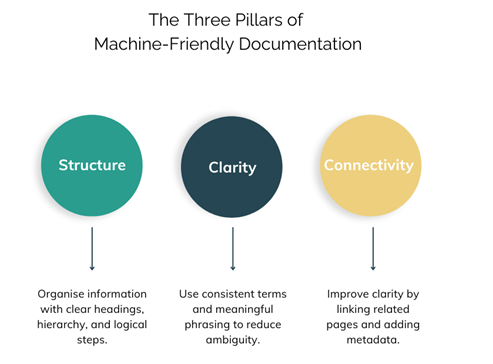
Search engines read content differently from humans. They rely on signals such as structure, headings, consistency, and contextual links to understand meaning and index pages effectively. The following techniques help machines interpret content more accurately:
Start with keyword research
Perform keyword research to understand the type of queries and phrases users are actually searching for, as this might be quite different to the internal terminology your documents use. Do this without keyword stuffing, instead, include keywords naturally.
Use descriptive, meaningful headings
Machines rely heavily on headings to determine what a section is about. Vague labels like “Overview” or “Information” are less helpful than:
- “How the filtration system works”
- “Troubleshooting: Device won’t power on”
- “What error code 241 means”
Clear headings also improve snippet eligibility, increasing the chance of your content being summarised directly in search results.
Keep a clean heading hierarchy
Avoid skipping heading levels or using headings for styling. Each level (H1 → H2 → H3) signals a connection. A clear structure with the main topic (H1), main sections (H2), and subsections (H3) makes the content easier for both users and machines to understand.
Proper nesting helps machines “map” your content.
Write task instructions in clear steps
Numbered lists are far easier for search tools and AI models to understand than paragraphs describing a process. This also makes your content more accessible. This aligns with research from Nielsen Norman Group showing that users scan procedural content more effectively when it’s broken into steps.
Use contextual internal links
Internal links help machines understand the relationships between topics. For example:
“See Resetting the device for step-by-step instructions.”
This strengthens topical relevance and helps users move through tasks intuitively.
Optimise metadata, lightly
You don’t need keyword-laden titles. Instead, write clear, simple page titles and meta descriptions that accurately describe the user’s task or problem. Keep titles under 60 characters and descriptions under 160 to avoid truncation.
Ensure mobile-friendliness
With more than 62% of users searching on mobile, according to Statista.com, having a mobile-friendly structure is essential. Use concise paragraphs, clear headings, responsive design, compressed images, and structured data to support both usability and SEO.
Google explicitly recommends structured data to help search engines understand page context and enhance visibility in search results.
Supporting AI and SGE: writing for the next wave of search
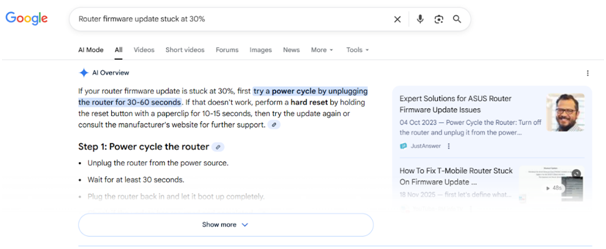
AI-driven search tools pull content from highly structured, clearly indicated documentation. Unstructured text is difficult for models to interpret.
To support AI summarisation:
- Use FAQ-style sections for common queries
- Add short definitions for specialised terms
- Ensure headings accurately reflect the content
- Make steps and procedures explicit, not implied
- Use natural language that mirrors user questions
AI models love clarity and structure, two things technical communicators already excel at.
A practical checklist of search-friendly writing
Headings
- Does each heading describe the content beneath it?
- Could a user (or a machine) guess the meaning from the heading alone?
Structure
- Is there only one H1?
- Does the hierarchy flow logically?
- Are lists used for tasks rather than long paragraphs?
Language
- Are terms used consistently?
- Are steps written in active, concise sentences?
- Are ambiguous words (“this”, “that”, “it”) avoided where clarity matters?
Discoverability
- Are related topics linked contextually?
- Are FAQs or troubleshooting entries clearly highlighted?
Mobile-friendly
- Is the design responsive?
- Are images properly resized and compressed?
- Is structured data implemented?
Small, impactful adjustments like these enhance both human usability and machine comprehension without altering your writing style.
Conclusion
Technical communicators already produce clear, structured content. Search-friendly writing simply helps that content reach users faster by improving its visibility in search results and AI summaries. A few thoughtful adjustments to structure and terminology can make documentation easier for both humans and machines to understand.
About Ashleigh
Ashleigh is the founder of Seed & Scale SEO, an independent consultancy based in Cape Town, South Africa, helping businesses worldwide grow sustainably through search. She is passionate about SEO, and brings years of experience driving organic growth across industries, from healthcare and travel to luxury services and recruitment technology.